
Popular
Not Guarded
- 31 views
ISSUE / FAULT CODE:
“NOT GUARDED”
This alarm indicates that the guards were not detected either when the Start button was pressed or while the batch was in process. Reset the alarm and then check that the guards are in position and locked in place before starting again.
With the guards in place, press F3 to open IO screen and check DI4 for illumination, if off then the safety relay has not reset. Inspect that the safety sensors are clean and nothing is blocking them. If this does not resolve the alarm then place the guards in position, and then turn the machine off for 15 seconds before powering on. This should clear any errors inside the safety sensors.
It is possible for this fault to occur on start up if power was lost to the machine while it was in cycle. The alarm will appear on the screen after attempting to start a cycle. Simply reset the alarm and continue operation.
If this alarm is occurring during a cycle with all the guards pinned in place, then the safety sensors may need to be repositioned.
1. The system has three guards that must be in place for the system to allow pressurizing of the hopper
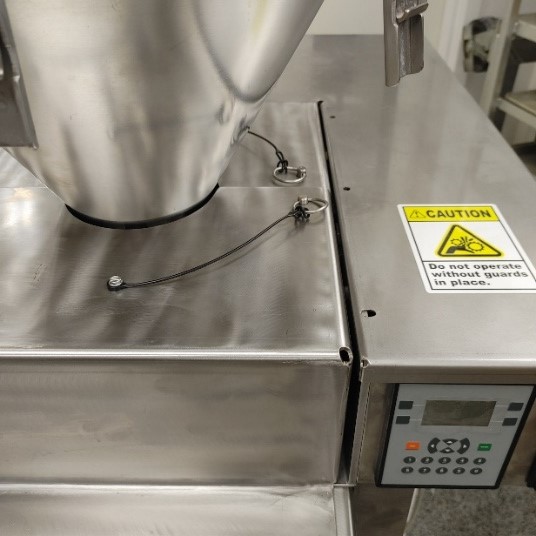
2. Two guards surrounding the hopper must be slid into place and pins fully pressed into their holes
AFTER NEXT IMAGE
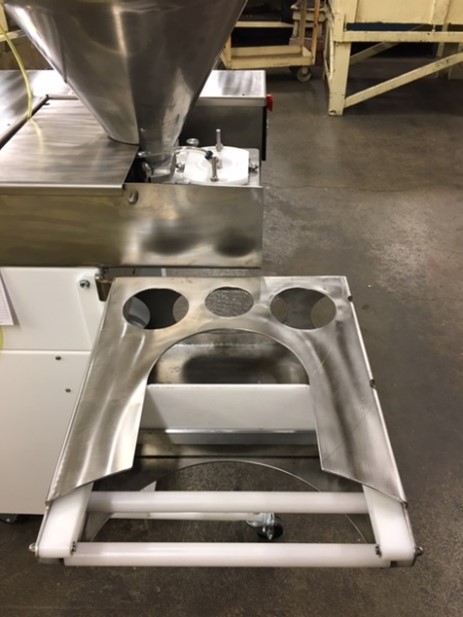
3. Pan handler needs to be fully shut, underneath the hopper and secured with the pin underneath