

Skip to content
  • Onboarding Process
  • Employee Training
  • Support / Fault Codes
  • FAQ
Contact Us
  • Onboarding Process
  • Employee Training
  • Support / Fault Codes
  • FAQ
x

Popular

  • Employee Training
  • Onboarding
  • Fault Codes
Insitu / Docs / Block Ext Fault
Troubleshooting
  • Check Controller Terminals
  • Diagnose a Valve Failure
  • System Air Leaks
  • Air Compressor Maintenance
  • Hopper Will Not Seal
  • Check System Pressure
  • Troubleshooting Guide
Maintenance
  • Memory Card Installation
  • Air Filter
  • Replacing Air Valve
Manager Training
  • Machine Inspection
  • Oiler Operation (3-in-1 Dough Processor)
  • Navigating the Control Screen – Manual Controls
  • Navigating the Control Screen – Advance Settings
  • Incomplete Dough Blowout
  • No Pressure Build
Onboarding
  • Safe Machine Operation
Employee / Operator Training
  • Safety Information
  • Daily Operating Procedures
  • End of Day Shut Down
  • Machine Assembly
  • Switching Dough Pocket
  • Not Pressurized
  • Not Guarded
  • Knife Ret Fault
  • Using The Control Screen
  • Disassembly For Cleaning
Fault Codes
  • Knife Ext Fault
  • Fault Codes
  • Block Ext Fault
  • Settings Fault
  • Pressure Drop
  • E-Stop Pressed
  • Over Max Pressure
  • Over Min Press
  • Block Ret Fault
  • Compressor Timeout
Repair Guides

Block Ext Fault

  • 26 views

The block did not reach the extended position

  • Test for free movement of dough block by hand
  • Check system air pressure
  • Press F4 to open IO screen to check DI 9 for illumination. If block is retracted and DI9 not illuminated, then check the cylinder proximity sensor. There should be a yellow light indicating cylinder position.
  • Use the manual controls to test movement
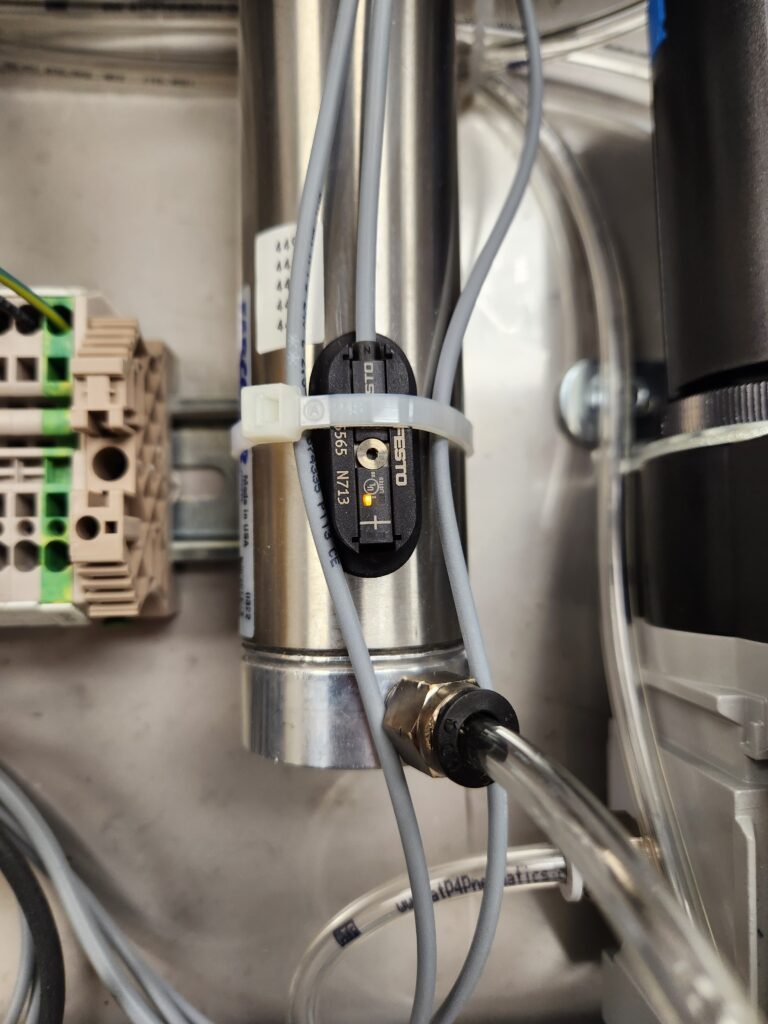
Block retracted indicator light
© 2025 INSITU Foods, LLC